You can create date comparison rules that compare the dates of objects in classes with a specified date or current date.
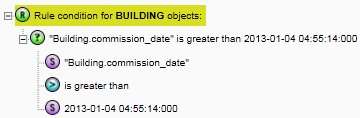
This example rule checks all building objects with a commission date after 2013-01-04 04:55:14:000.
The final rule is as follows:
Set a Class of BUILDING on the root node.
Click  and select Condition then
Comparison.
and select Condition then
Comparison.
Select the upper <<value>> element. From the Type list, select Static Value.
From the Datatype list, select String.
Enter the value Building.commission_date
Select the <<relationship>> element. From the Type list, select Scalar Relationship.
When the second Type list appears, select Greater Than.
Select the second <<value>> element. From the Type list, select Static Value.
From the Datatype list, select Timestamp.
Enter the value 2013-01-04 04:55:14:000