Snapping allows two features to move so that the co-ordinates coincide. When you structure data, you specify a tolerance where features can be snapped together. Snapping is a useful way of cleaning up and aligning features. You can also discover geometry errors, for example spikes, self-intersections, duplicate vertices, and narrow sections in a polygon.
Snapping types exist in the network and planar topology models.
For the network model, the following snapping types exist:
· Share nodes
· Nodes split edges
· Edges split edges
The planar model only consists of the Edges split edges snapping type.
If a node of a newly created or modified geometry is sufficiently close to the node of an existing object, the new geometry is adjusted to share the existing node.
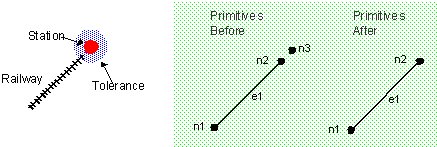
In the example below, a railway line has been added, its end point lying within the tolerance of a station. When a share node tolerance is defined and the station and the end of the line lie within it, these two objects snap together, sharing a single node.
If the node of a newly created or modified geometry is sufficiently close to any part of an existing object and the snapping type should be set to nodes-split-edges, the edge closest to the node is split into two, with a node between the two new edges. The new geometry is adjusted to share this node. In the example below, the town is shown as snapping to the road, which does not move. Control over which objects move when snapping takes place is defined by the order of classes.
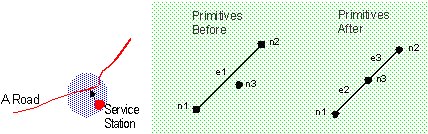
Conversely, if the edge of a newly created or modified geometry (the A-road) is sufficiently close to the node of an existing object (the B-road), the edge is split in two, and the new geometry is adjusted to share the existing node.
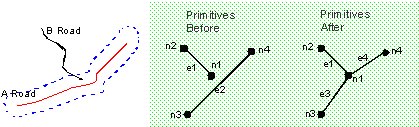
If any part of a structured geometry is sufficiently close to any part of an existing object, the edges closest to the meeting point in both objects are split into two. A node is created between the two new edges in the existing object, and the new geometry is adjusted to share this node.
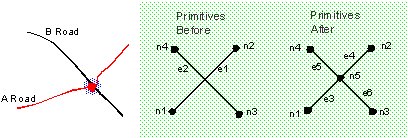
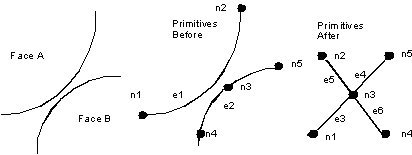
In the planar topology model, two faces come close to each other. The node on the edge of Face B is split into 2, and the new geometry is adjusted to share the existing node.