

Migrating & Integrating Assets to TechOne with FME Q&A

Migrating & Integrating Assets to TechOne with FME Q&A
Q. Can FME be used to integrate GDV Hub and create a seamless workflow, verifying assets through to imports?
Yes. 1Integrate, the underlying rules engine running the validation, has FME Flow as a native datastore. This means that the submission can be pushed through to an FME workspace to be validated with simple custom business rules, and/or translated into another format, or in this use case, written to an SDE Table or Feature service that can be read into a spatial import layer. It should also be noted that 1integrate also has ESRI Feature Service, Oracle Spatial, and SQL Server as native datastores for output writing, and may curb the need for FME.
Q. Do you have experience loading or extracting data from Tech1 Budgeting and Forecasting module?
No, however the same options would be available to you in FME and TechOne. The web services can be created in TechOne in any module and FME can communicate to any module using the same integration options. And in FME, assuming you’ve created a web connection for just your CIA Oauth credentials back when you set up other web services for Asset, etc, you reuse it for the web service created for your Budgeting & Forecasting data module.
Q. Is there a particular web service in TechOne that is easier to work with for testing purposes? Both exporting data into our GIS and importing data into TechOne.
To use FME to extract data from OneCouncil, you can point it to any web service available in TechOne. To extract data that is a meaningful test, I would suggest setting up a really simple data model and using that to create a web service in OneCouncil.
For importing data into TechOne, there is no best option for testing, as the import is dependent on what you have configured in OneCouncil. For example, if you want to import Asset data into the Asset module using Asset Spatial Processing, your GIS layer would need to have features with an ID that matches the GIS ID in the asset class in order for syncing to be successful. Similarly, if you are using worksheets to import the data in, the key field(s) that the worksheet expects would need to match items that exist in OneCouncil.
Q. How do you turn a Data Model into a Web Service? Is there a Help document/video provided by T1?
Browse to Connect > Web Services > Web Service Definitions in OneCouncil. From there, choose Add > Create using DataSource.
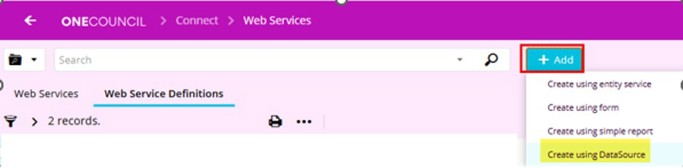
You can then choose the data model as your data source.
Tip – only fields in the data model with a ‘default display’ setting turned on will be available in the web service.
Q. Any recommendations in maintaining existing data in TechOne from Various data sources? We have been preparing the initial data import load in FME. We are now looking at BAU updates as changes occur in the original data sources in property and rating compliance. We did the initial import using import load templates.
Ideally, you only want to be importing data into OneCouncil where it has changed in your source of truth, and you want to push that update into OneCouncil. For example, a stormwater pipe location has changed, or you have changed a footpath type from concrete to paved. You could use FME to first detect in your source of truth datasets what items have changed. This could be achieved using change detection or simply looking for a modified date since your last sync process. Once the changed items have been identified, you can then push those changes to OneCouncil.
How you push those changes into OneCouncil will depend on your setup and your preferred method. For example, you could use FME to export all the changed datasets (in the worksheet template format or expected layer format) into a OneCouncil server folder and have an ETL that watches the folder and imports when there is something in there. Alternatively, you could use FME to have a data virtualisation setup and point OneCouncil to those endpoints as the layer source for the spatial imports. Or another option if you have Esri, is to have a map service running that can be used as your layer sources and you use FME to not only filter the changed data before updating the underlying feature class that the map service layer is looking at, but also to complete your data validation so the import does not fail (eg no duplicate key fields, OGC compatible geometry). To reiterate, there is no right or wrong method, the best option will depend on your environment and your business preferences.
Q. What specific skills/training do we need to have to work effectively with the new model (besides FME)?
This would depend on what components in OneCouncil you want to utilise. If you want to use Asset Spatial Processing, for example, there are basic overviews available on the TechOne University. If you want to dive deeper into creating your own web services and building data models, I suggest doing some training on creating data models. The data models give you complete control over what data you can view and extract and you can also use the data models in other OneCouncil components such as dashboards. ETL training is another option if you want to automate imports into OneCouncil or don’t want to use the scheduling options available directly on the data models, worksheet imports or asset spatial processing, for example.
Q. Has there been any success in loading additional information to property using spatial data, including associated custom attribution? An example would be flood zones and flood height
There is an option called Spatial Attribute Generation in the Property and Rating module where you can configure a spatial overlay layer and use that as a source to import data to Additional Information (aka attributes for on-prem P&R users) or Themes. The reliability of this import and how it handles slivers, overlaps, duplicates, etc are not fully understood and would depend heavily on your spatial data integrity.
An alternative option that has worked more successfully from experience is to use a non-spatial option to generate your worksheet import files. For example, you could use FME to identify from your spatial flood zones layer which land or property (depending on how your additional information type is configured) intersects the layer. From that, you can then use FME to generate your worksheet import file. An ETL could be configured on the OneCouncil side where you then browse to your saved worksheet file, and it runs the import, or you could use FME to save the output to the server folder for OneCouncil and have the ETL job watch that folder to trigger an import.
Q. Are you able to share the details of CiA Web connections so we can use them ourselves?
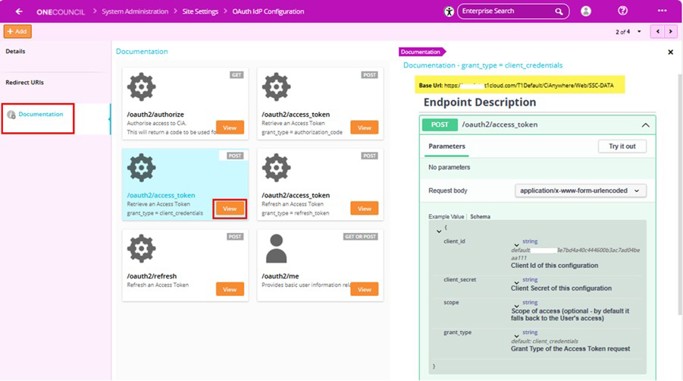
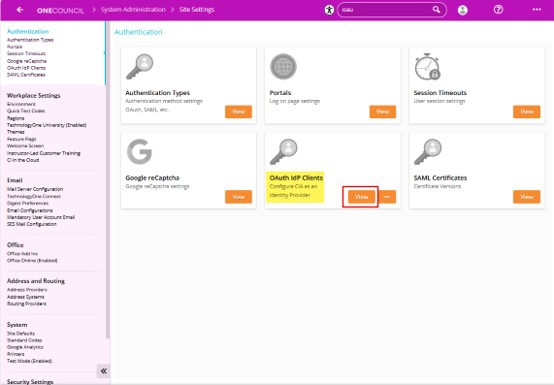
In OneCouncil, browse to System Administration > Site Settings > OAuth IdP clients and then click View.
Add a new entry here to create a new OAuth IdP client. From that new client entry, you can then get the client ID and client secret. Under the documentation setting for the client, view the details for the ‘/oauth2/access_token grant_type = client credentials’ option. The base URL is what you will need to form the FME web service request URL.
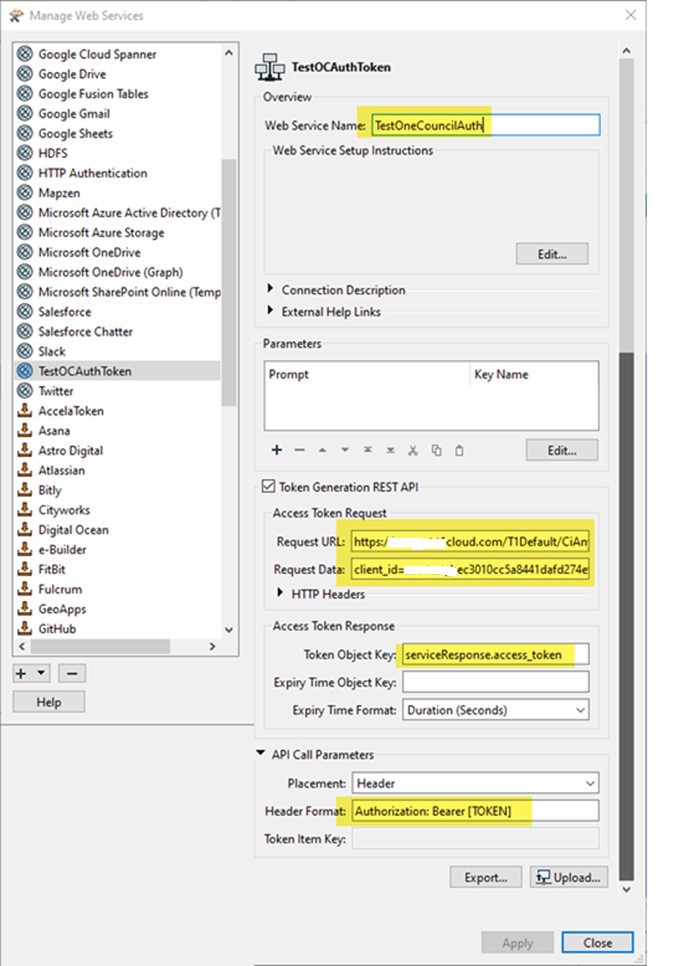
In FME, create a web service connection with the following settings:
a. Request URL: (this can be found on the T1 side when setting up the OAuth authentication)
https://<Base URL from OneCouncil OAuth Client settings>/oauth2/access token
b. Request Data:
client_id=<client id here>&client_secret=<secret goes here>=&grant_type=client_credentials
c. Token Object Key:
serviceResponse.access_token
d. API Call Parameters Placement:
Header
e. Header Format:
Authorization: Bearer [TOKEN]
Q. How do you improve the performance of a datamodel based api when usually an asset record has multiple levels, which cause the size to grow?
Tips to help with performance include:
· only have required fields in the data model to reduce how much information is extracted
· make sure you are only returning distinct records in the data model
· if you have more records in the data model than you can return in one request from FME, then make your data model a stored data model rather than an online one. For example, consider a scenario where you have an online data model in OneCouncil and there are only 5 fields and fewer than 40000 records. In FME, your page size setting on the HTTP caller is set to 50000 records. You will be able to extract all the records in one request and do not need to do any pagination on the HTTP request. In this scenario, you could leave your data as Online. If you have more records than you can safely return in one HTTP request, then make your data model stored. From personal experience, online data models can result in FME sending duplicate records and then missing records when you can’t retrieve all the data in one request. A stored data model removes this issue.
· Change your HTTP request page size setting to a value that makes sense for your data model. If you have a large number of fields in the webservice/data model, reduce your page size setting. If you have only a few fields and many records, you can increase your page size. Consider, however, whether this will actually improve your FME workspace performance, especially if you have blocking transformers.
If you found these Q&A insights valuable, you can watch the full webinar recording to explore the discussion in more detail and learn from the experiences shared by councils across Australia.
What You’ll Learn
✅ Key stages of preparing asset data for TechOne Cloud
✅ Repeatable FME workflows that streamline migration
✅ Integration patterns that support stable, maintainable production systems
✅ Common challenges and how to avoid them
✅ Real-world use cases and lessons learned from previous projects
✅ How to design future-proof pipelines for ongoing data updates and business growth