

Highlights of FME 2026.2
FME 2026.2: Native MCP Hosting, Smarter Automation and Stronger Security
Article written by Ian Fletcher, FME Expert at 1Spatial
June marks the second of four anticipated product updates across Safe Software’s FME platform, and FME 2026.2 brings together a wide range of enhancements covering day-to-day workspace authoring, AI-ready workflows, security and administration. All parts of the platform have been touched in this packed release, so there is likely to be something of interest for all users. This summary highlights some of the key enhancements that we feel are going to be of most interest to members of the community.

MCP Server Hosting
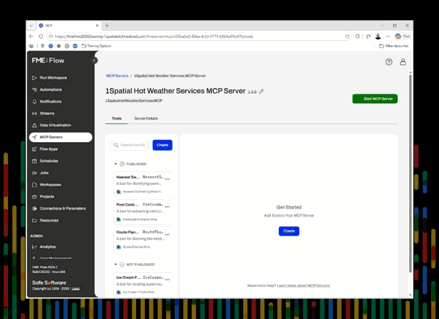
The headline feature in FME Flow for this release builds on the initial features introduced in FME 2026.1, where users could build FME workflows which could reference external MCP (Model Context Protocol) Servers. FME Flow 2026.2 goes one step further, with the ability to create an MCP Server natively within Flow itself! This means users can now explore the benefits of MCP enabled processes while retaining full control over how they are used, and the data they can be exposed to.
FME Flow can now host an MCP Server, allowing any MCP-compatible AI agent of your choice to query it. Every decision made by the AI agent through the FME Flow MCP host can be audited, authenticated, and controlled through the familiar FME Flow interface. Importantly, while the MCP server can be exposed to an array of MCP-compatible tools including FME workspaces, only the tools themselves and not the AI agent has access to the data. MCP tools return structured JSON back to the agent, which is controlled by an FME workspace.
Figure 1: MCP Hosting within FME Flow
Security and Administration
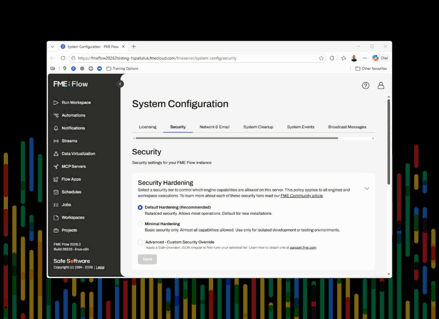
Some of the feedback from IT and Security personnel has also been addressed in the latest release. Software administrators can now apply Security Hardening settings to FME Form and FME Flow engines, with two default options, Default and Minimal Hardening, as well as a third option for defining custom rules. These security policies can only be applied to users with Administrator access and can be rolled out and monitored automatically using Command Line controls. FME Form no longer uses the embedded Chromium browser for web authentication, instead relying on the more secure default browser. In FME Flow, System Restores now include improved logging and error handling, with configuration options that allow non-fatal errors to be skipped rather than causing an entire system-restore to terminate by default. In summary; FME is now easier to deploy securely in your organisation.
Figure 2: Security Hardening of FME Flow
Other Key Feature Enhancements
MCP hosting may be the standout feature, but it is far from the only feature improvement in FME 2026.2:
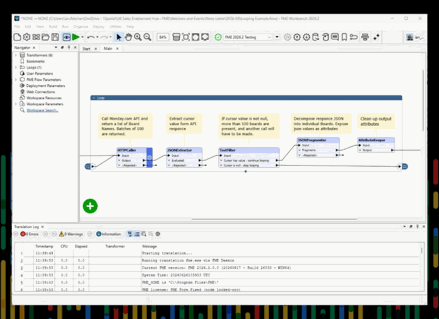
- Workspace looping can now be achieved directly on the canvas, with a design intended to be easier to build, maintain, and debug. Rather than embedding complex looping logic inside custom transformers, loops now operate directly in the main workspace through a bookmark-like interface. Combined with the live feature caching functionality released in the spring, this offers a significant improvement for testing complex processes that rely on looping functionality to complete.
- FME Realize now captures geotagged data such as photos, LiDAR, and video within a single app, with support for secure cloud storage options and optional workspace automations when new data arrives to the designated cloud storage system.
- FME Flow Directory Watch automations can also now be pointed to SFTP servers, bringing SFTP directory functionality in line to existing features of Network Directory locations.
- User Parameters benefit from a more intuitive error-identification interface to help users identify and triage simple validation issues with parameter values which can be captured before running a workspace.
Figure 3: Native looping within an FME Workspace
New Formats and Transformers
As you would expect from any FME release, 2026.2 also delivers a substantial set of updates to formats and transformers. JSON handling in FME Form has been significantly enhanced, in line with its elevated importance as the exchange format for MCP processes. A JSON Writer, or FeatureWriter now behaves like any other format in a Form workspace, with full schema and feature type support. JSON creation has also been improved, with additional support for nested arrays, blob objects, and lists alongside two new transformers—JSONObjectBuilder and JSONAppender designed to generate JSON objects from FME features without the need for templates.
The NoFeaturesTester, an FME Hub favourite, is now a native transformer making it more widely available to users who do not regularly access the FME Hub. Additional transformer and format improvements include updates to Snapper, AnchoredSnapper, OpenAIConnector, and Terminator, as well as a new Archived Directory and File Pathnames Reader. New formats include a reader for OpenDocument Text (.odt), a writer for PDF/A, and enhancements to the CityGML 3 writer, including full support of Appearance and Texture content.
Conclusion
The full list of enhancements, formats, and new functionality in FME 2026.2 is too extensive to cover fully in this short overview so get in touch to learn more.
Hopefully, this summary has demonstrated that this release offers something for everyone, as all parts of the FME platform are touched by this update. While MCP hosting is clearly the big-ticket item here, do not underestimate the practical value of some of the other functionality, such as Native Looping, JSON functionality or User Parameter validation will have on the day to day experience all FME users will have.
Readers who want to stay up to date with the latest developments are encouraged to subscribe to product updates on the FME Community page, and anyone with questions about MCP hosting in Flow, other new features, or upgrading an FME installation is invited to contact the FME team at 1Spatial.
Talk to our FME Experts
If you have any further questions on upgrading your FME infrastructure to take advantage of these tools, please be in touch with the FME team here at 1Spatial!
Contact Us